
How to Download YouTube Shorts: A Step-by-Step Guide
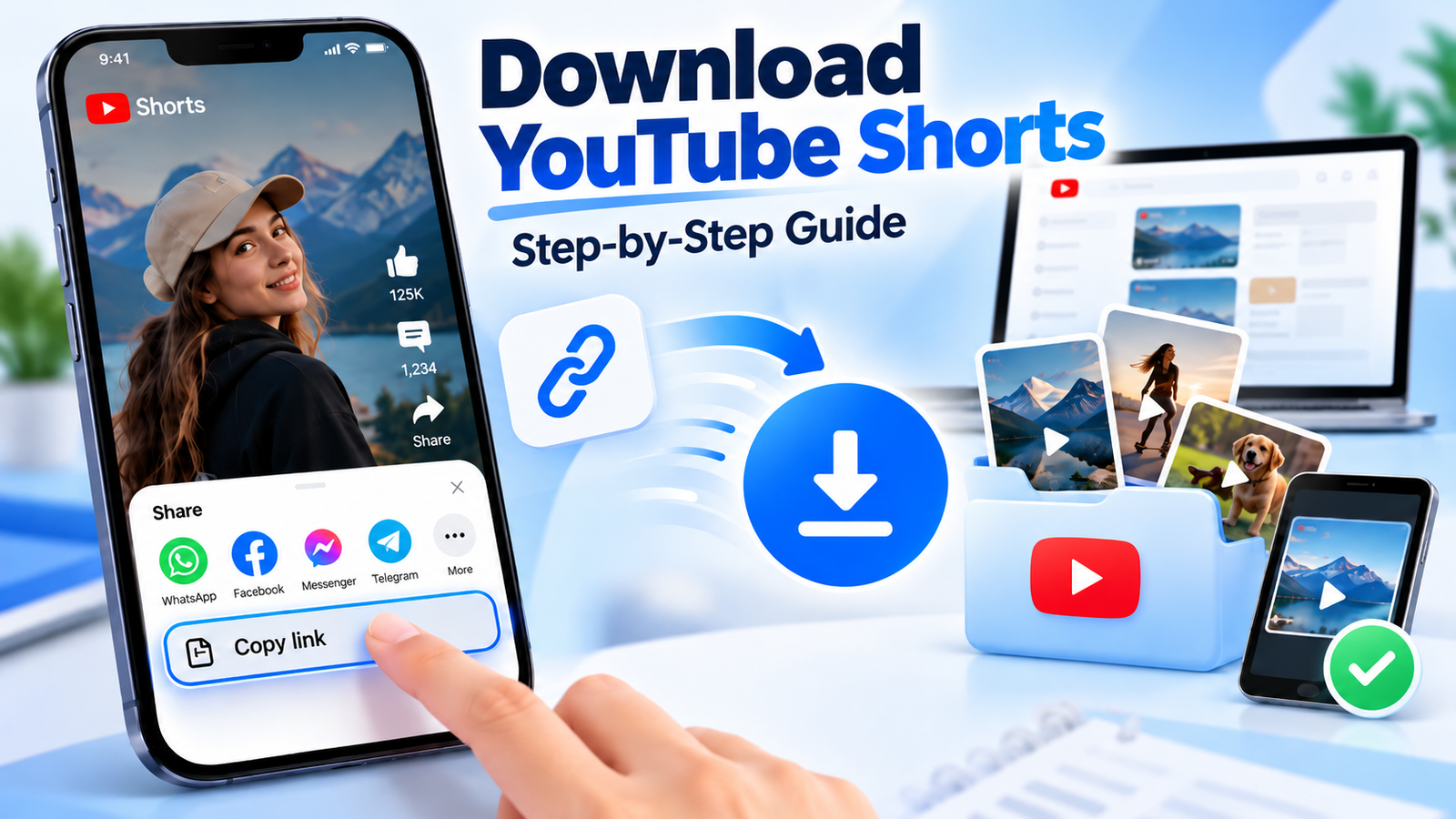
You're scrolling through YouTube Shorts when something catches your attention. Maybe it's a 30-second recipe, an interesting camera trick, or a workout you want to try tomorrow.
You think, "I should download this before I forget." You tap a few buttons, open your Gallery, and realize the video isn't there.
Did it disappear? Not necessarily. Here's the detail many tutorials overlook: saving a Short, downloading a video file, and watching offline aren't the same thing.
In this step-by-step guide, you'll learn how to download YouTube Shorts on Android, iPhone, PC, and Mac, where saved videos go, and how to fix common download problems.
Quick Answer: Can You Download YouTube Shorts?
Yes, depending on the video and method. You can download eligible Shorts you've uploaded as video files. YouTube may also allow eligible Shorts to be saved for offline playback inside its app. If you only want to find a Short again, saving it to a playlist may be enough.
Official offline downloads generally remain inside YouTube rather than becoming ordinary MP4 files in your Gallery.
Download vs Save vs Offline: What's the Difference?
Imagine you're preparing for a long flight. You discover a Short demonstrating a simple stretching routine and save it to a playlist, thinking you'll watch it on the plane.
Once you're offline, however, the Short won't play. Why? Because saving a video to a playlist only bookmarks it. It doesn't download the video data.
The illustration below shows the three common ways to keep a Short and what each one actually does.
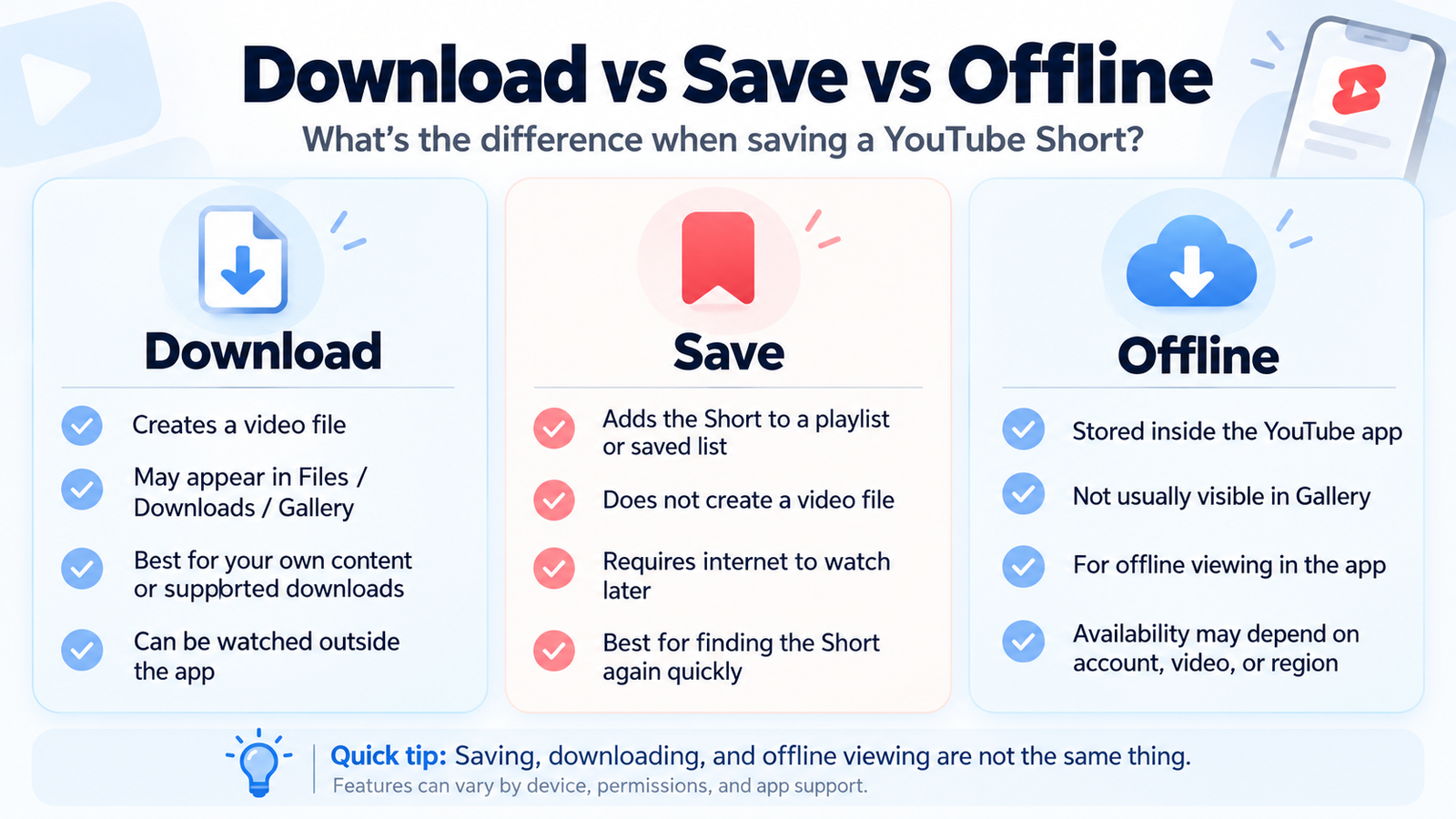
The important difference is where your video remains accessible. A saved playlist item still points to YouTube. An offline download is managed inside YouTube. A regular video file can be stored in your device's file system.
Download a File
Obtain an actual video file through an available, authorized method. Useful for backing up your own Shorts.
Save to Playlist
Bookmark a Short inside your account. Easy to find again, but normally requires internet.
Offline Viewing
Watch eligible downloaded content inside YouTube without a continuous internet connection.
Which YouTube Shorts Download Method Do You Need?
Here's a better question than "Which downloader should I use?"
What do you want to do with the video? Your answer determines which method makes the most sense.
For example, someone saving a cooking tutorial for next week has a different goal from a creator backing up their own uploaded Short.
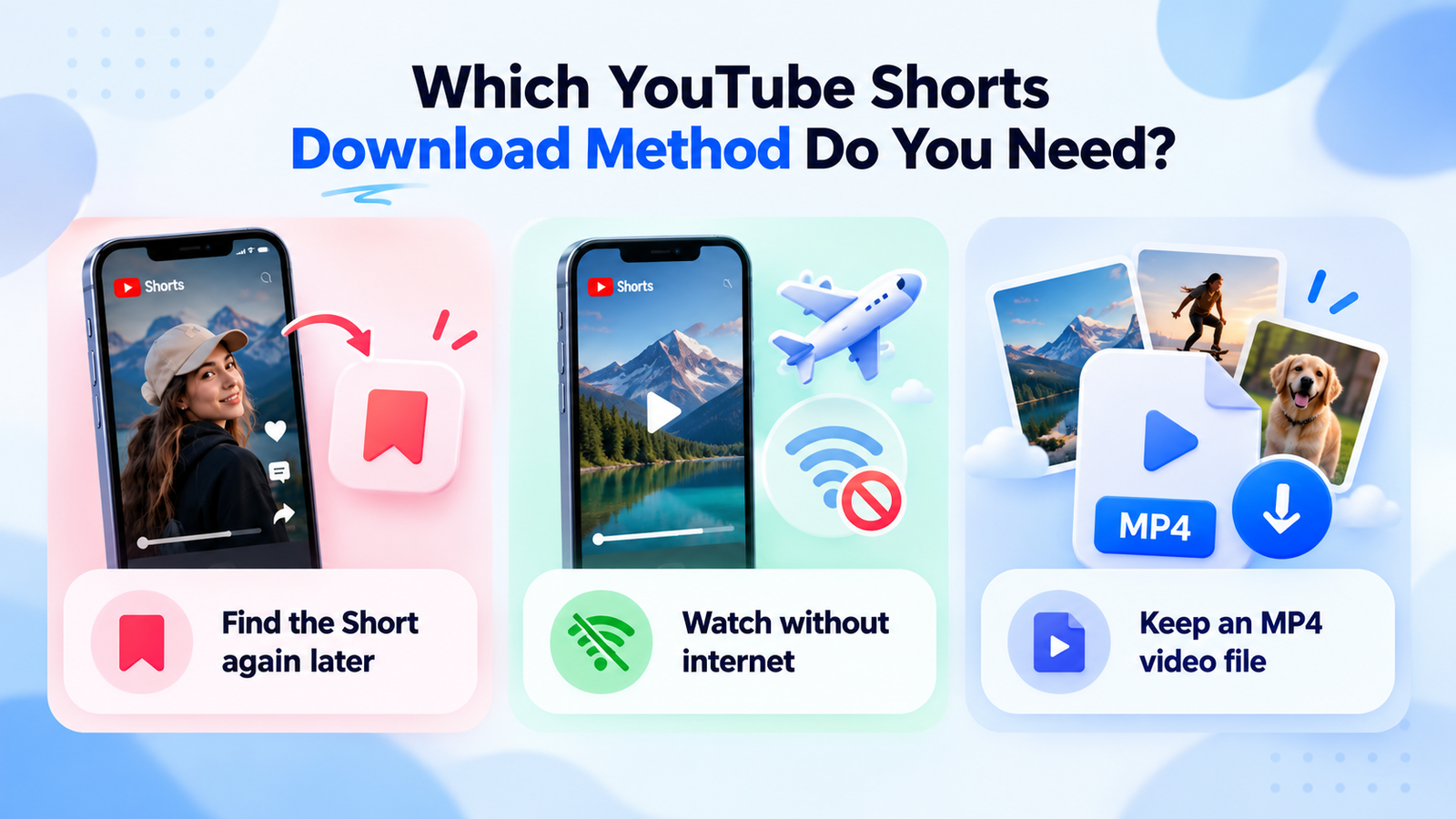
Now select your goal below. The guide will recommend the most appropriate starting point.
Use YouTube's Save to playlist option to return to the video later. This doesn't create an MP4 file.
Learn how to copy a Short's link →How to Copy a YouTube Shorts Link
A YouTube Shorts link is simply the video's web address. Keeping a copy helps you share the Short, store it in your notes, or reference it later.
You don't need a complicated application. YouTube provides a built-in sharing option.
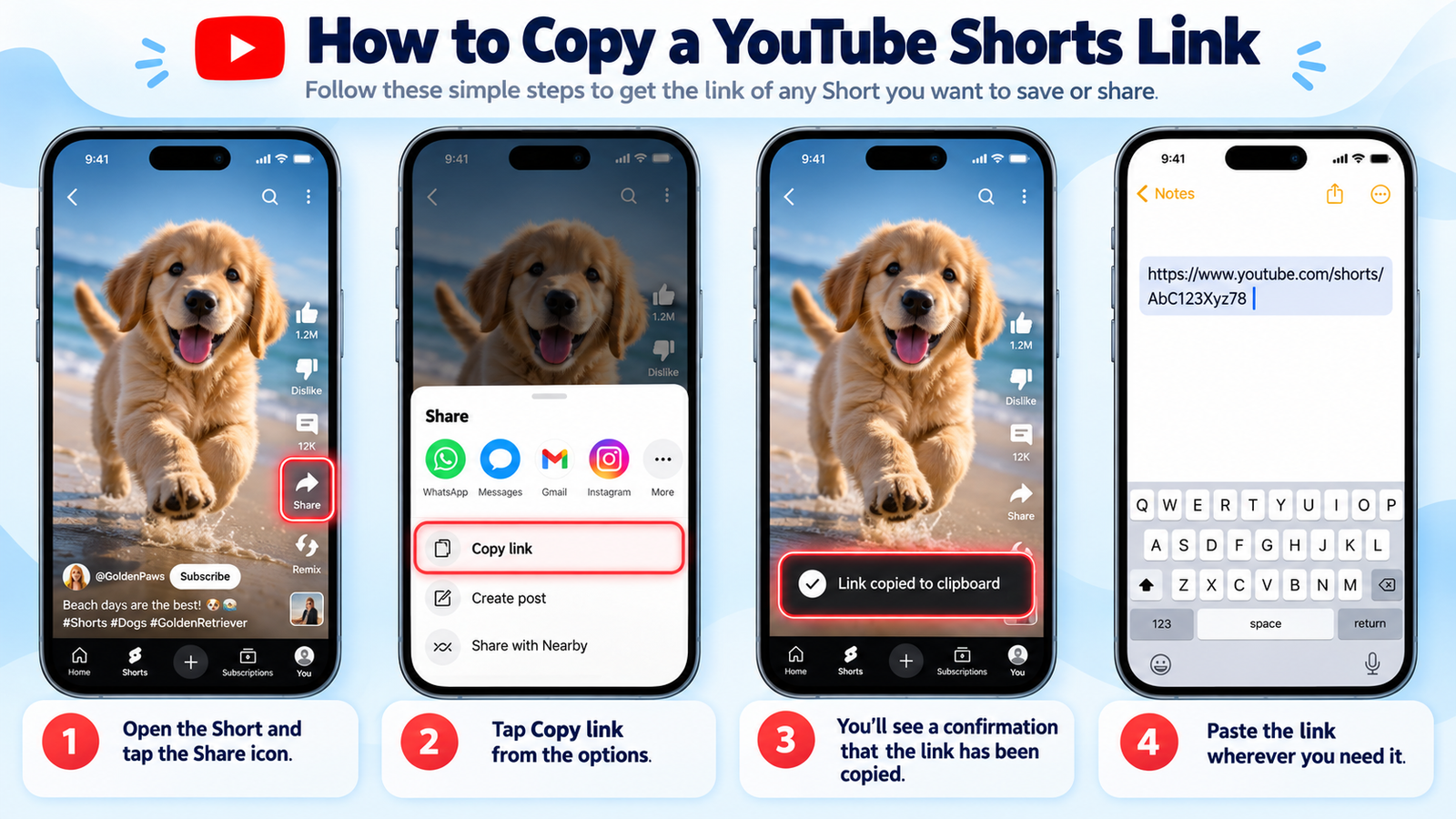
Copy a Short's Link in Four Steps
- Open the YouTube app and find the Short.
- Tap the Share icon.
- Select Copy link.
- Paste the URL wherever you want to keep it.
If you're unsure where to tap, use the visual walkthrough below.
What Does a YouTube Shorts URL Look Like?
Once copied, a typical link looks like this:
https://www.youtube.com/shorts/VIDEO_ID
The /shorts/ part indicates
a Shorts URL, while the last portion
identifies the video.
If your link doesn't work, try opening it directly in a browser. A deleted, private, or restricted Short may no longer be available.
How to Download YouTube Shorts on Android
Suppose you're about to travel somewhere with unreliable mobile internet. You've found several useful Shorts and want to watch them during the journey.
YouTube's official offline feature may help, provided your account and the videos are eligible.
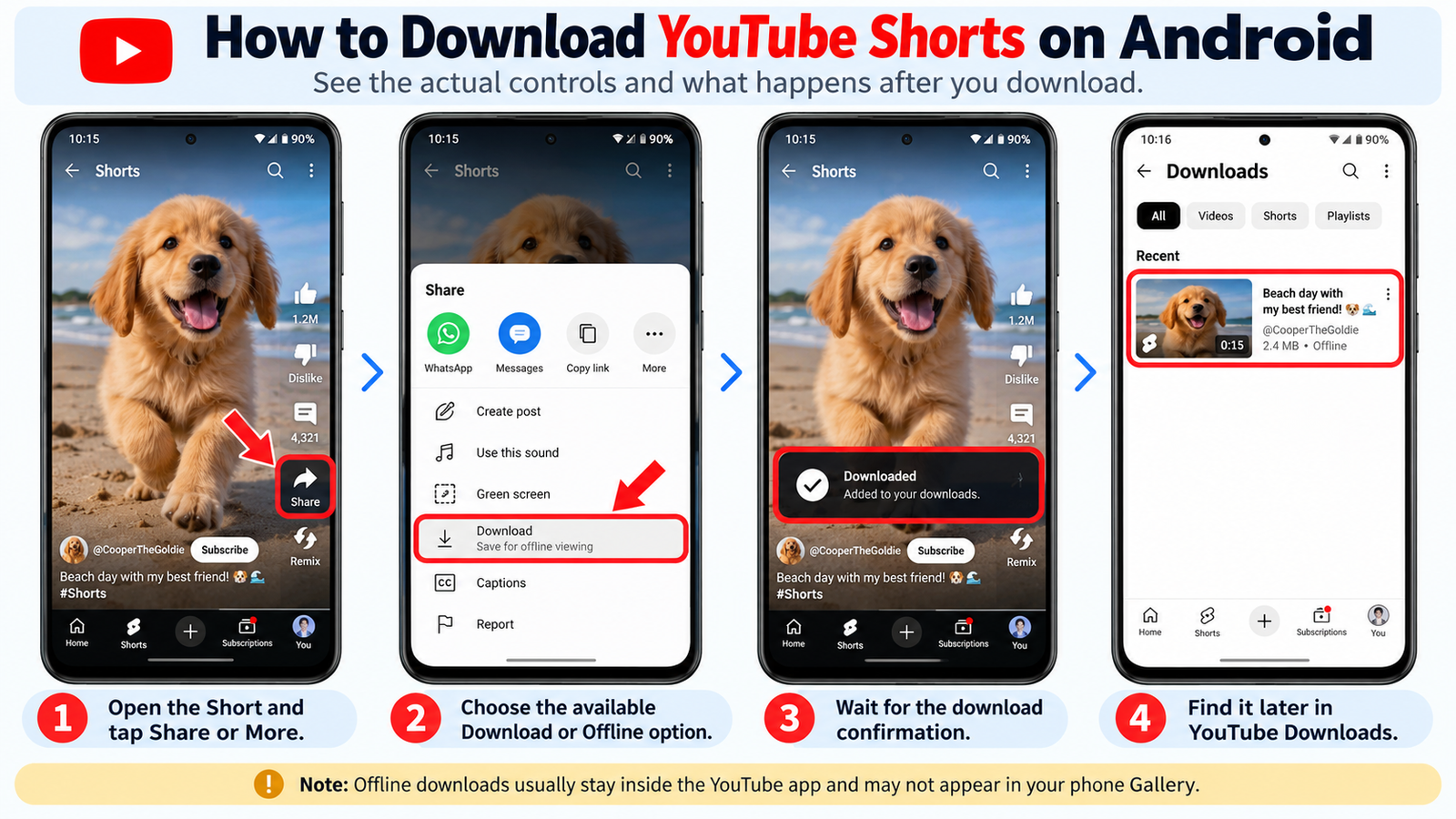
Download an Eligible Short for Offline Viewing
- Open the YouTube app on your Android device.
- Sign in to your YouTube account.
- Open the Short you want to watch.
- Check its available controls or menu for Download.
- If the option is available, download the video and open YouTube's Downloads area.
The following Android walkthrough illustrates the process and the place where eligible offline videos can be found.
Why Doesn't the Video Appear in Gallery?
YouTube's built-in offline system is designed for watching videos inside YouTube. It normally doesn't export a regular MP4 to your Android Gallery.
What About Downloading Your Own Uploaded Short?
If you've uploaded the Short yourself, YouTube or YouTube Studio may offer a Save to device option for eligible videos.
Unlike ordinary offline viewing, this can produce a regular video file.
How to Download YouTube Shorts on iPhone
On iPhone, knowing where a video is stored can be just as important as knowing how to download it.
Files, Photos, and YouTube Downloads are different locations. A video saved inside YouTube doesn't automatically appear in Photos.
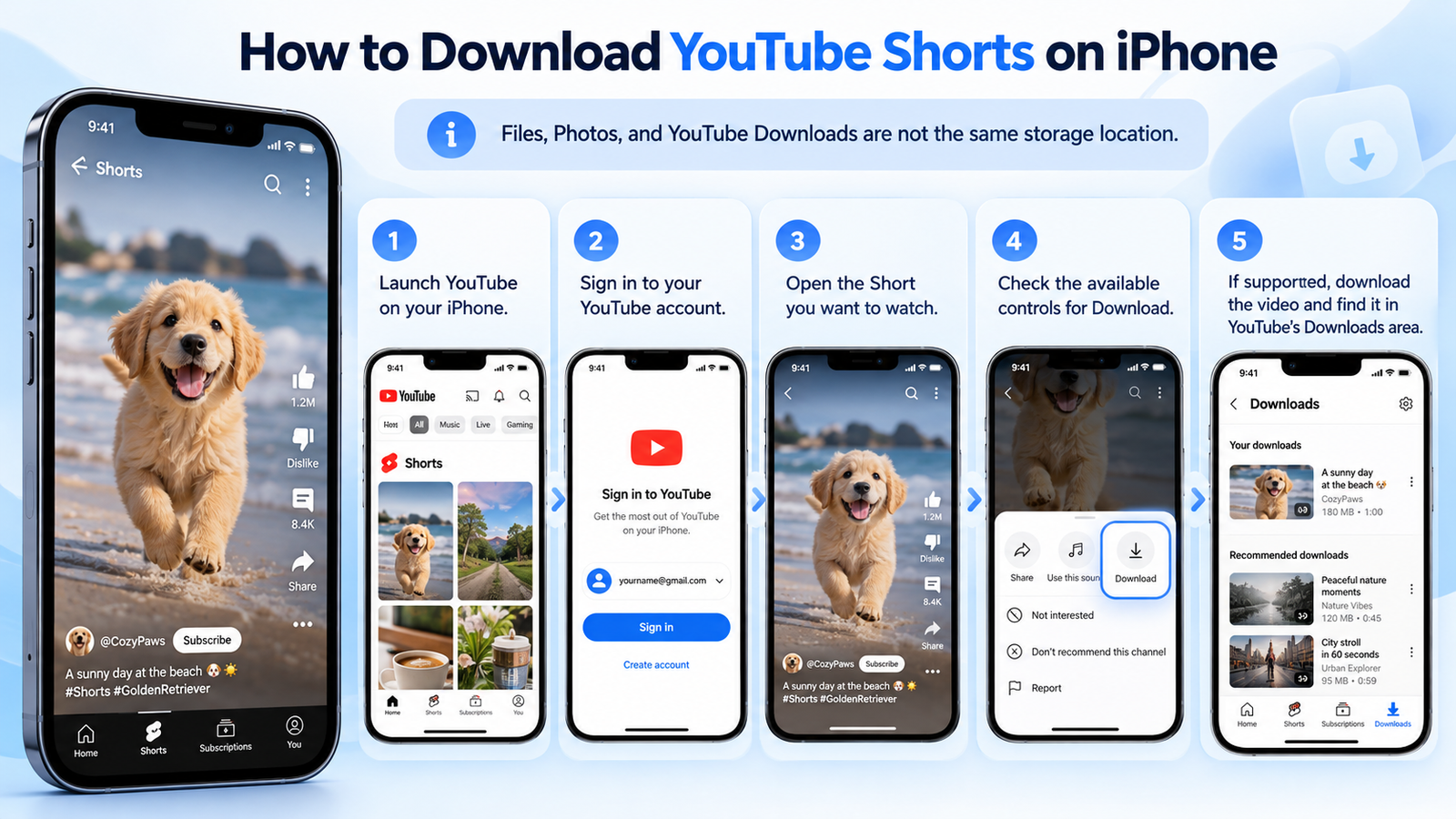
How to Watch Eligible Shorts Offline
- Launch YouTube on your iPhone.
- Sign in to your account.
- Open the Short you want to watch.
- Check the available controls for Download.
- If supported, download the video and find it in YouTube's Downloads area.
The iPhone walkthrough below illustrates the steps. The exact controls you see may vary according to your account, app version, and video.
What Happens After You Download?
When the eligible offline download finishes, you can access the Short through YouTube's Downloads area. It isn't automatically transferred to the Photos app.
This distinction matters most when you're searching for your video later without internet access.
Where Does an iPhone Store Downloaded Videos?
Suppose you've obtained an authorized MP4 through a supported method. Depending on your browser settings, it may be stored in the Files app, usually under Downloads.
If you'd prefer to see that file in Photos, you may need to save it there separately.
The distinction becomes easier to understand when you compare these three storage locations.
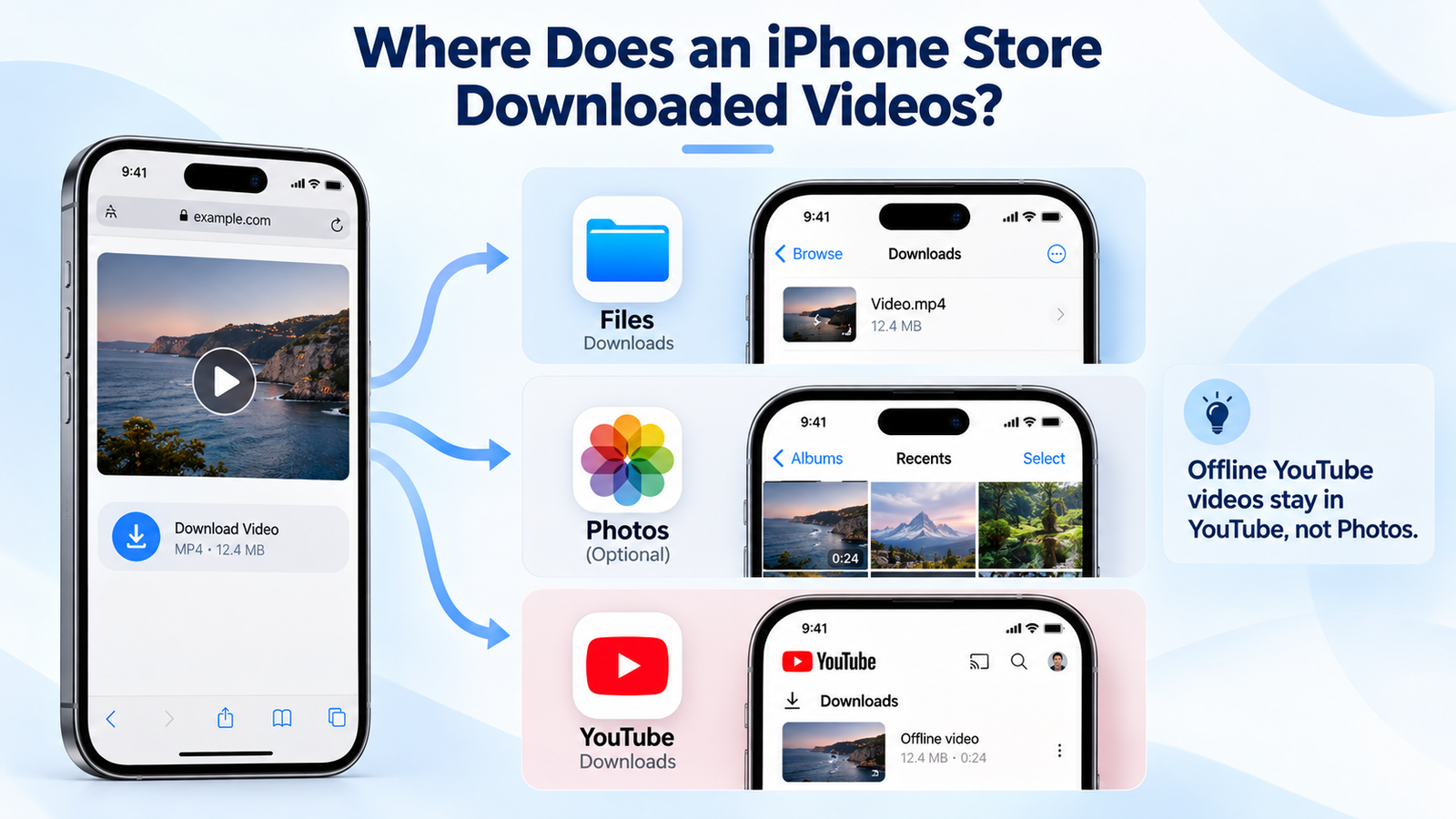
Here's the practical rule: if a Short plays offline inside YouTube but isn't in Photos, that is generally expected behavior.
How to Download Your Own YouTube Shorts on PC or Mac
Imagine you're editing a new compilation and suddenly need a Short you uploaded several months ago. Unfortunately, the original file is missing from your laptop.
YouTube Studio may provide a solution. It allows creators to download eligible videos they've uploaded to their own channels.
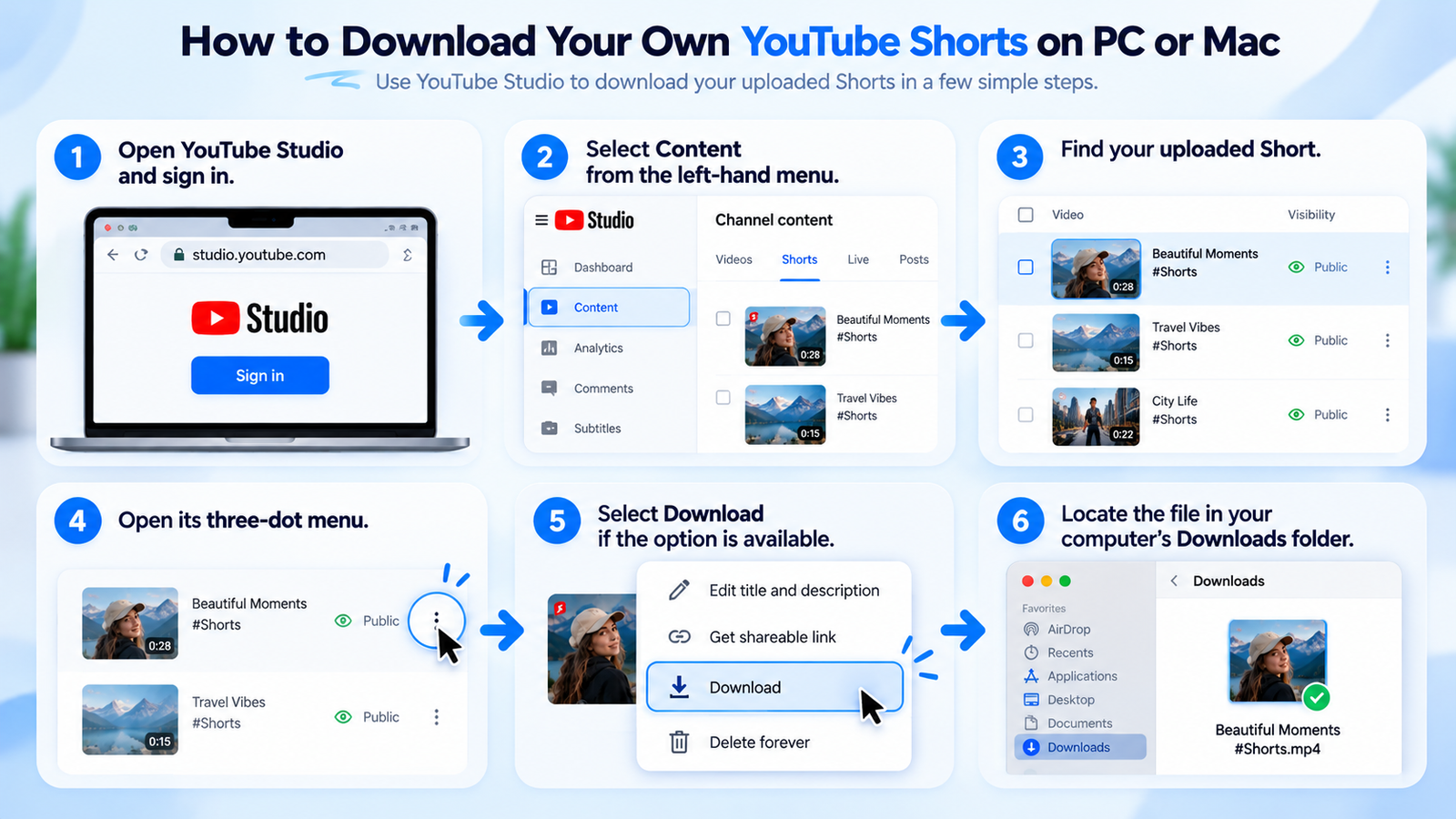
Download a Short Through YouTube Studio
- Open YouTube Studio and sign in.
- Select Content from the left-hand menu.
- Find the Short you've uploaded.
- Open its three-dot menu.
- Choose Download if the video is eligible.
- Check your computer's Downloads folder.
Follow the numbered walkthrough below to identify the relevant controls inside YouTube Studio.
Where Does the File Go After Downloading?
Most browsers save downloaded video files in the computer's Downloads folder, unless you've selected another location.
On Windows, open File Explorer. On Mac, open Finder. Then check Downloads or the location configured in your browser.
How Does a YouTube Shorts Downloader Work?
You've probably seen websites offering downloads through a pasted Shorts URL. The concept is straightforward, although actual capabilities vary.
A service receives the video URL, checks whether it can process the content, and may offer a file when the video and intended use are supported and permitted.
Here's the typical process without the unnecessary technical details.
| Step | What happens | What to check |
|---|---|---|
| 1. Copy | Copy the Short's URL using YouTube's Share menu. | Make sure the link is complete. |
| 2. Process | The service checks the video URL. | Avoid websites requesting your Google password. |
| 3. Download | A supported, authorized video file may be available. | Verify permission, file type, and quality. |
Can Every YouTube Short Be Downloaded in 1080p?
No. The available quality depends on the original upload, available video versions, and the method used.
A service advertising 1080p doesn't automatically guarantee that every video will be available at that resolution.
Where Do Downloaded YouTube Shorts Go?
You've downloaded a YouTube Short, but when you open your phone's Gallery, it's nowhere to be found. Did something go wrong?
Not necessarily. The location depends on how you downloaded the video. A YouTube offline download and a regular MP4 file are stored differently.
To make that difference easier to understand, look at the illustration below. It compares videos kept inside YouTube with files saved directly to your device.
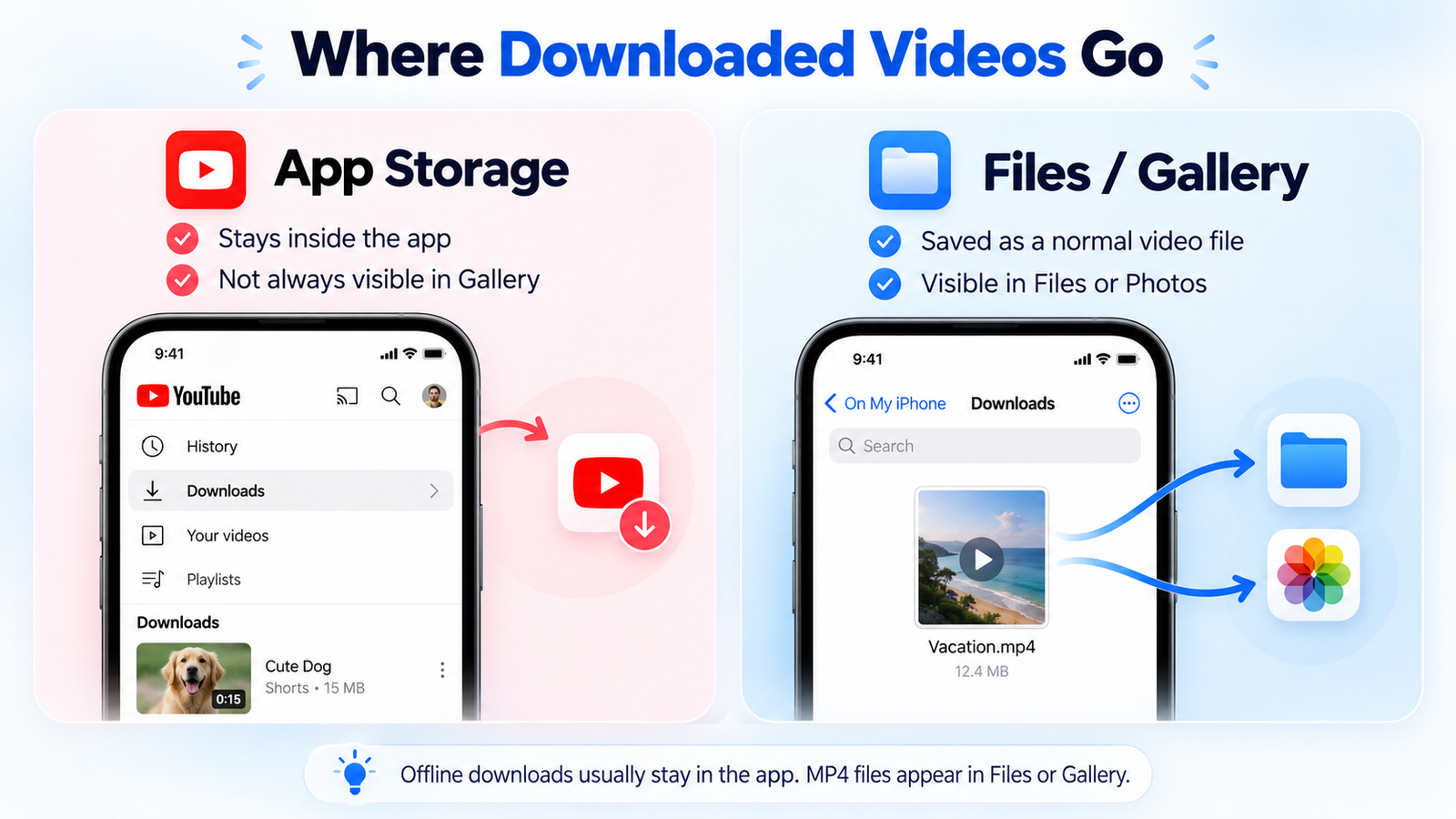
Here's what the illustration is showing: YouTube's official offline feature keeps eligible videos in its managed download system, whereas ordinary MP4 files are stored in your device's file system.
That means searching every folder on your phone won't necessarily help you find a YouTube offline download. You need to look in the right place first.
YouTube Offline Downloads
If you used YouTube's official offline feature, open YouTube and look for its Downloads area.
These videos generally won't appear as normal MP4 files in Gallery or Photos.
Ordinary MP4 Files
If you downloaded an authorized video file, check your device's Downloads folder or file manager.
On iPhone, you may need to save a file to Photos separately.
Where to Find Downloaded Shorts on Each Device
Still can't locate your video? The table below provides the most likely starting location for each device.
| Device | Regular MP4 File | YouTube Offline Download |
|---|---|---|
| Android | Files / Downloads | YouTube Downloads |
| iPhone | Files / Photos if saved there | YouTube Downloads |
| Windows | File Explorer / Downloads | Supported YouTube offline viewing |
| Mac | Finder / Downloads | Supported YouTube offline viewing |
Why Can't I Download YouTube Shorts?
Sometimes the Download button is missing. Sometimes a download stops unexpectedly. And occasionally, you simply can't locate the saved video.
The best approach is to identify the problem before repeating the same action.
Use the troubleshooting illustration below as a starting point, then check the more specific solutions in the table.
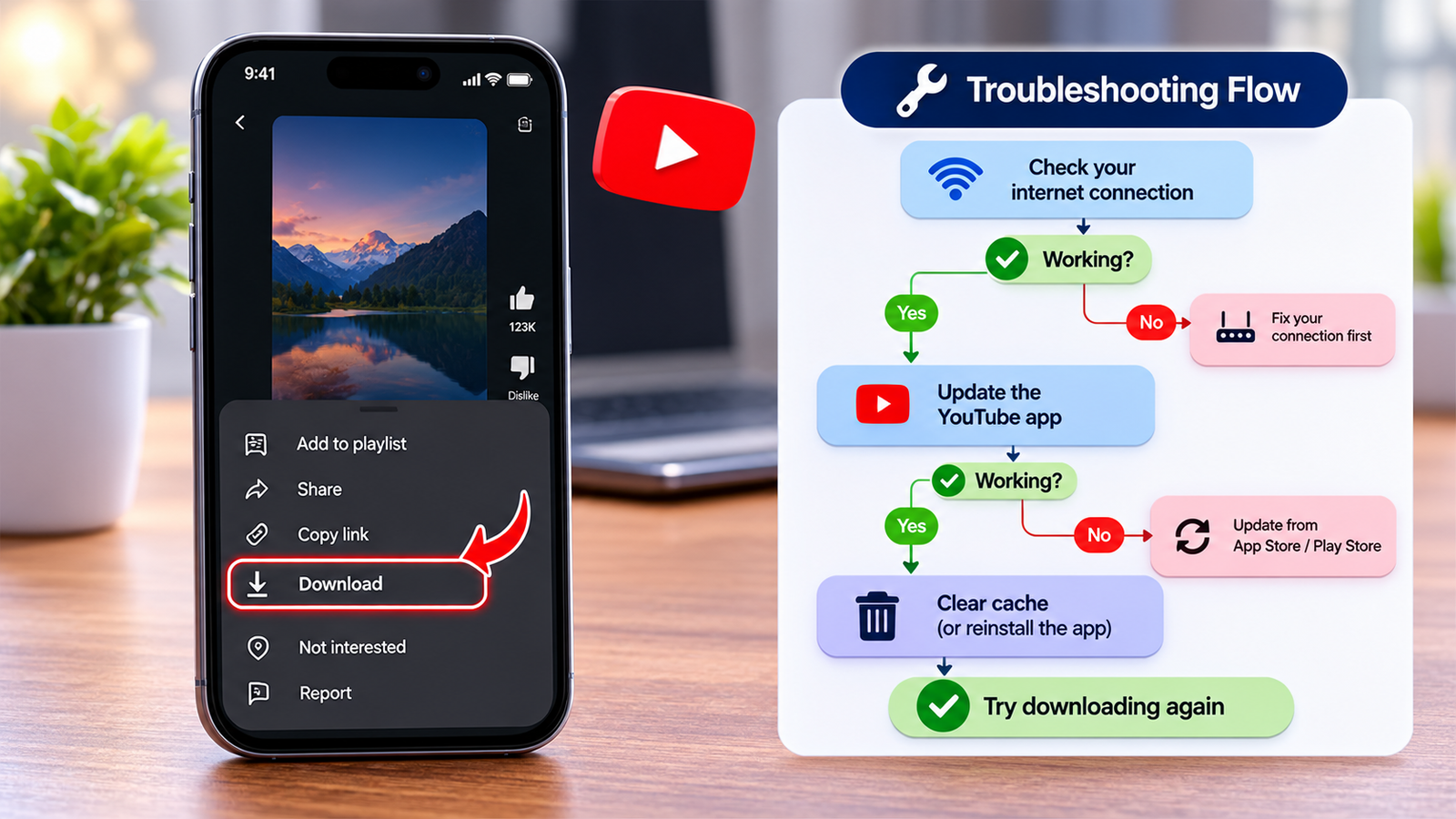
Not every download failure has the same cause. An unavailable video, insufficient storage, and a missing account feature require different fixes.
| Problem | Possible cause | What to do |
|---|---|---|
| Download button missing | Video or account isn't eligible. | Check official feature availability. |
| Download interrupted | Weak connection or limited storage. | Check internet stability and free space. |
| Video not in Gallery | Saved inside YouTube. | Open YouTube Downloads. |
| Video link not working | Video removed, private, or restricted. | Check the original video's availability. |
| Unexpected file downloaded | Potentially suspicious service. | Avoid opening unfamiliar executables. |
Is It Safe to Download YouTube Shorts?
A website can look modern, professional, and trustworthy while still containing misleading download buttons or suspicious redirects.
Before downloading a file, consider whether the source is trustworthy and whether you're permitted to obtain the video.
This safety checklist summarizes several warning signs worth recognizing.
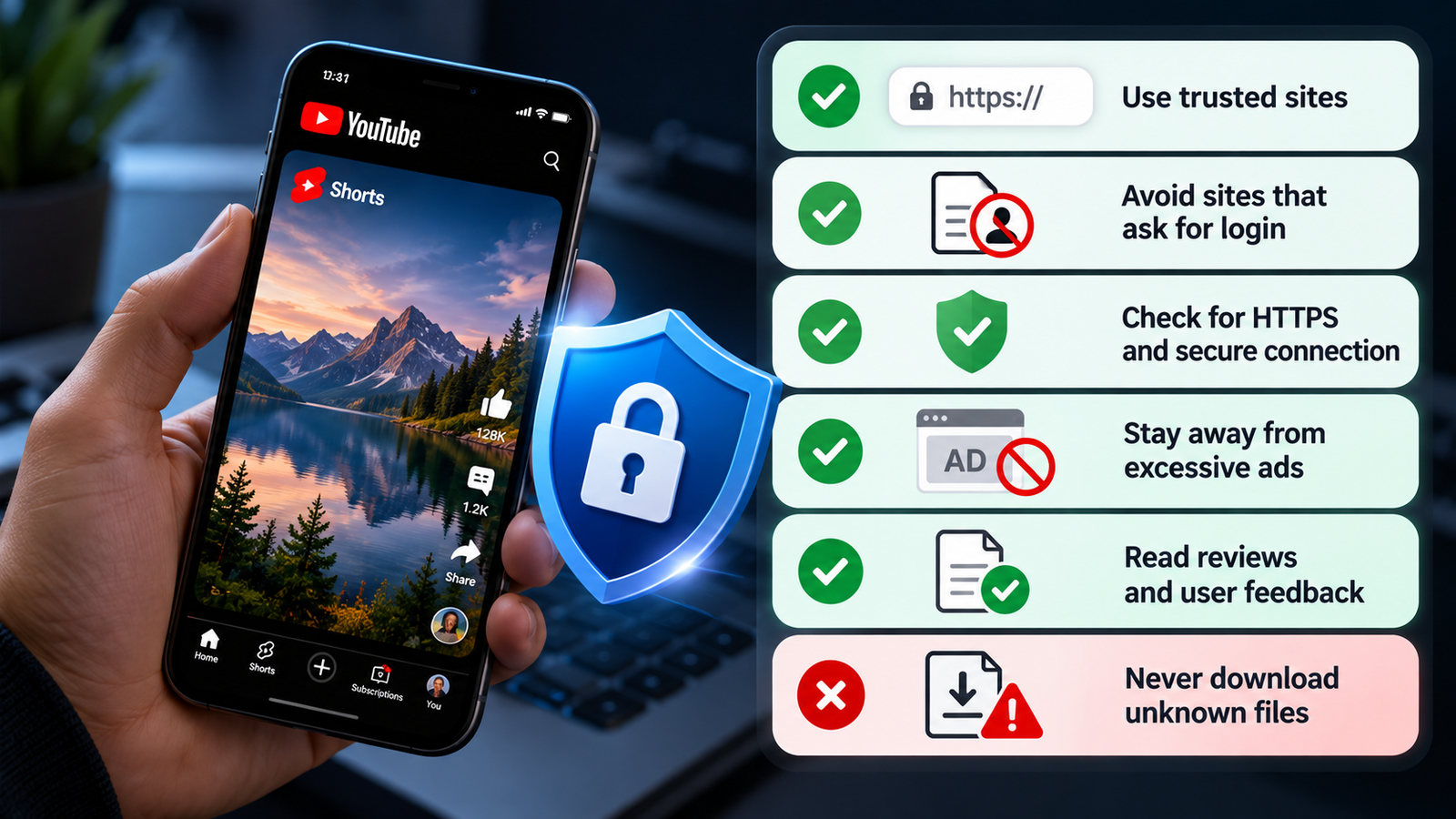
The safest habit is to avoid unnecessary permissions, unexpected software installations, and services that ask for your Google account password.
Five Safety Rules Worth Remembering
- Protect your account. Never provide your Google password to an unrelated downloading website.
- Inspect the website address. HTTPS helps protect the connection but doesn't guarantee legitimacy.
- Avoid misleading controls. Excessive redirects and fake download buttons are warning signs.
- Check the file type. If you expected an MP4 but received an executable program, don't open it.
- Respect creator rights. Downloading a video doesn't automatically grant permission to republish it.
Frequently Asked Questions
Still have questions? Open any question below for a clear explanation. You can expand multiple answers.
Can I download YouTube Shorts for free?
You can download eligible videos you've uploaded through YouTube's creator features. Some official offline options may be available without Premium in selected regions, while others require an eligible subscription.
Can I save YouTube Shorts directly to Gallery?
An authorized MP4 file can be stored on your device. Official YouTube offline downloads generally remain within the YouTube app.
Why can't I find the Download button?
The video, account, or region may not support the feature. App versions and the interface can also affect which controls are available.
Can I download Shorts on a PC or Mac?
You can download your own eligible uploads through YouTube Studio. Some supported accounts may also have official offline viewing options on desktop.
Can I watch downloaded Shorts without internet?
Yes, when a video has been successfully downloaded through an eligible official offline feature. YouTube may require periodic reconnection to verify availability.
Can I download YouTube Shorts in 1080p?
Available resolution depends on the uploaded video, supported formats, and method. Not every download offers 1080p.
Where do downloaded Shorts go on iPhone?
Official offline downloads remain inside YouTube. Regular MP4 files may appear in Files or in Photos if saved there separately.
Can I download another creator's Short?
Use supported official offline viewing where available, or obtain an authorized file from the creator. Downloading doesn't automatically give you permission to reuse content.
Do YouTube offline downloads expire?
They can require periodic internet reconnection and availability verification. Ordinary MP4 files don't follow the same in-app offline access system.
What's the easiest way to keep a useful Short?
If you only need to find the video again later, save it to a playlist or copy its URL. You don't always need to download a complete video file.
Final Thoughts: Save Your YouTube Shorts the Right Way
Remember the useful Short you discovered at the beginning of this guide?
You now know why different saving methods produce different results. A playlist helps you return later. Official offline downloads help you watch eligible videos without a continuous connection. Creator downloads can provide ordinary video files.
The most useful skill isn't simply finding a Download button. It's knowing which method fits your goal and where the video will be stored afterward.
Once you understand that, keeping useful YouTube Shorts becomes much less confusing.
YouTube features vary by video, device, account, and region. Illustrations are explanatory graphics, not verified live screenshots.