
Solve Any Triangle From Known Sides and Angles
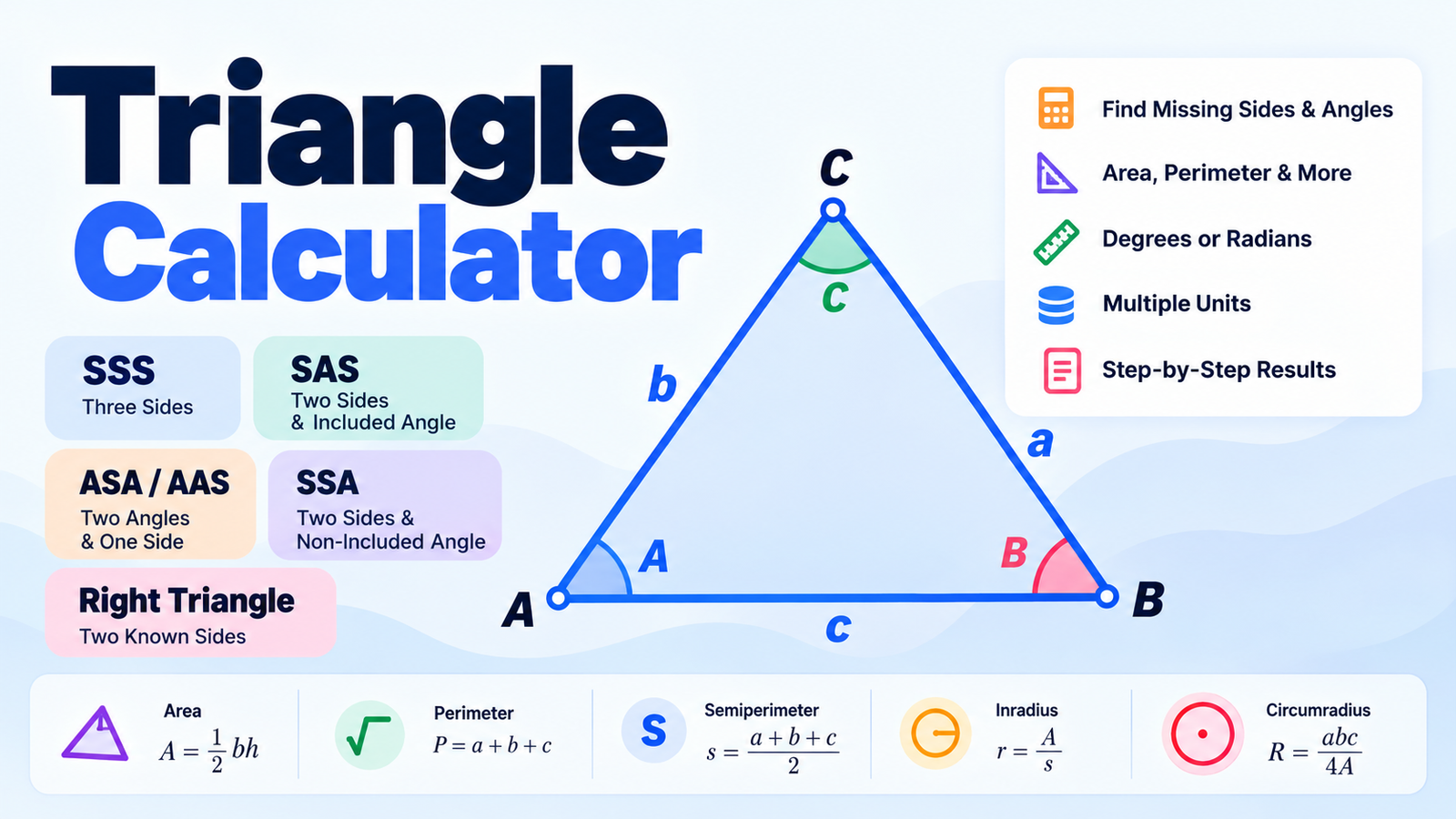
Our Triangle Calculator helps you solve triangles using the measurements you already know. Enter sides, angles, or a combination of both, and the calculator finds the missing sides and angles automatically.
The tool supports SSS, SAS, ASA/AAS, SSA, and right triangles. It also calculates the triangle's area, perimeter, semiperimeter, inradius, circumradius, and triangle type.
You can work in degrees or radians, choose a length unit, adjust decimal precision, view a labeled triangle diagram, and copy the complete result.
How to Use the Triangle Calculator
First, choose the calculation method that matches the information you already know. Enter the required values and select Calculate Triangle. The calculator also updates automatically when valid values are entered.
The available methods are:
- SSS: three known sides
- SAS: two sides and the included angle
- ASA / AAS: two angles and one side
- SSA: two sides and a non-included angle
- Right Triangle: two known sides of a right triangle
After solving the triangle, the results section displays all three sides, all three angles, area, perimeter, semiperimeter, inradius, circumradius, and the triangle classification.
SSS Triangle Calculator
Use SSS when all three side lengths are known.
For example, suppose:
a = 5b = 6c = 7
The calculator uses the Law of Cosines to determine the three missing angles.
For angle A:
A = cos⁻¹((b² + c² − a²) ÷ 2bc)
The same method is used for angle B, while the final angle can be found using the fact that the three interior angles of a triangle total 180°.
The area is calculated using Heron's Formula.
SAS Triangle Calculator
Choose SAS when you know two sides and the angle between them.
For example:
Side a = 8Side b = 10Angle C = 60°
The missing side is calculated using the Law of Cosines:
c = √(a² + b² − 2ab cos C)
Once the third side is known, the calculator solves the remaining angles and other triangle measurements automatically.
ASA and AAS Triangle Calculator
Use ASA / AAS when you know two angles and one side.
The missing third angle is found using:
C = 180° − A − B
The missing sides are then calculated using the Law of Sines:
a ÷ sin A = b ÷ sin B = c ÷ sin C
You can choose whether the known side is side a, b, or c, making this mode useful for both ASA and AAS problems.
SSA Triangle Calculator
The SSA case uses two sides and a non-included angle.
This calculation is important because SSA can sometimes produce two different valid triangles from the same measurements. This is known as the ambiguous case of the Law of Sines.
The calculator automatically checks whether the measurements produce zero, one, or two valid triangles. When two solutions exist, you can switch between Solution 1 and Solution 2 to compare them.
Right Triangle Calculator
Use the Right Triangle mode when one angle is 90° and you know two sides.
The calculator supports these combinations:
Leg a + Leg bLeg a + Hypotenuse cLeg b + Hypotenuse c
The missing side is calculated using the Pythagorean theorem:
a² + b² = c²
The remaining acute angles are then calculated using trigonometric relationships.
This mode can be useful for geometry homework, construction measurements, layout work, engineering calculations, and everyday distance problems.
Triangle Area and Perimeter
Once the triangle has been solved, the calculator also finds its area and perimeter.
The perimeter is simply:
Perimeter = a + b + c
The semiperimeter is:
s = (a + b + c) ÷ 2
When all three sides are known, the area can be calculated with Heron's Formula:
Area = √[s(s − a)(s − b)(s − c)]
The calculator performs these calculations automatically, so you do not need to solve them separately.
Inradius and Circumradius
For a fully solved triangle, the tool also calculates two useful circle measurements.
The inradius is the radius of the circle that fits exactly inside the triangle.
It can be calculated using:
Inradius = Area ÷ Semiperimeter
The circumradius is the radius of the circle that passes through all three vertices of the triangle.
It is calculated using:
Circumradius = abc ÷ 4 × Area
These values can be especially useful in geometry, engineering, design, and mathematical study.
Triangle Types
The calculator automatically identifies the triangle based on both its side lengths and angles.
A triangle may be classified by sides as equilateral, isosceles, or scalene.
It may also be classified by angles as acute, right, or obtuse.
For example, a triangle with side lengths 3, 4, and 5 is a scalene right triangle.
Triangle Side and Angle Labels
The diagram uses the standard triangle notation:
Side a is opposite Angle A.Side b is opposite Angle B.Side c is opposite Angle C.
Keeping each side matched with its opposite angle is especially important when using the Law of Sines or Law of Cosines.
The built-in triangle diagram helps you see these relationships while entering and reviewing your values.
Degrees and Radians
By default, the Triangle Calculator uses degrees, which are common in geometry problems.
You can switch to radians whenever needed. The calculator automatically converts the angle inputs and displays the solved angles using your selected angle unit.
You can also select common length units such as centimeters, meters, inches, or feet. Choosing a unit does not change the mathematical relationship; it simply labels the side lengths and calculated measurements appropriately.
Invalid Triangle Measurements
Not every combination of side lengths can form a triangle.
For example:
a = 2, b = 3, c = 10
cannot form a valid triangle because the two shorter sides are not long enough to meet.
For three sides to form a triangle, they must satisfy the triangle inequality:
a + b > ca + c > bb + c > a
The calculator checks these conditions automatically and displays an error instead of returning an invalid result.
It also validates angles, impossible right-triangle measurements, and invalid SSA combinations.
Common Uses for a Triangle Calculator
A triangle solver can be useful for geometry and trigonometry homework, engineering calculations, construction measurements, surveying, architecture, design, DIY projects, distance calculations, and checking manual calculations.
Because the tool supports multiple solving methods, you can use the same calculator whether you know three sides, two angles, a right triangle's legs, or another common combination.
Frequently Asked Questions
How do I solve a triangle with three sides?
Select SSS, enter sides a, b, and c, and calculate. The tool uses the Law of Cosines to find the missing angles and Heron's Formula to calculate the area.
Can I find a missing triangle side?
Yes. Use SAS, ASA/AAS, SSA, or Right Triangle mode depending on which sides and angles you already know.
Can I find missing triangle angles?
Yes. The calculator solves all missing angles whenever enough valid information is provided.
What do SSS, SAS, ASA, AAS, and SSA mean?
They describe which triangle measurements are known. S means side and A means angle. For example, SSS means three sides are known, while SAS means two sides and the included angle are known.
Why can SSA have two answers?
SSA can create an ambiguous case because the same known angle and two sides may form two different valid triangles. The calculator checks for both solutions automatically.
Does this calculator work for right triangles?
Yes. Select Right Triangle and enter any supported pair of known sides. The calculator finds the missing side, angles, area, perimeter, and other measurements.
Can I use radians?
Yes. You can switch between degrees and radians from the Angle Unit control.
Can I choose different length units?
Yes. You can use no unit or select centimeters, meters, inches, or feet.
Does the calculator show the formula?
Yes. The How This Was Calculated section explains the method and main formula used for the selected triangle type.