
Distance Formula Calculator
Find the distance between two points on a coordinate plane.
Distance Formula Calculator With Steps & Coordinate Graph
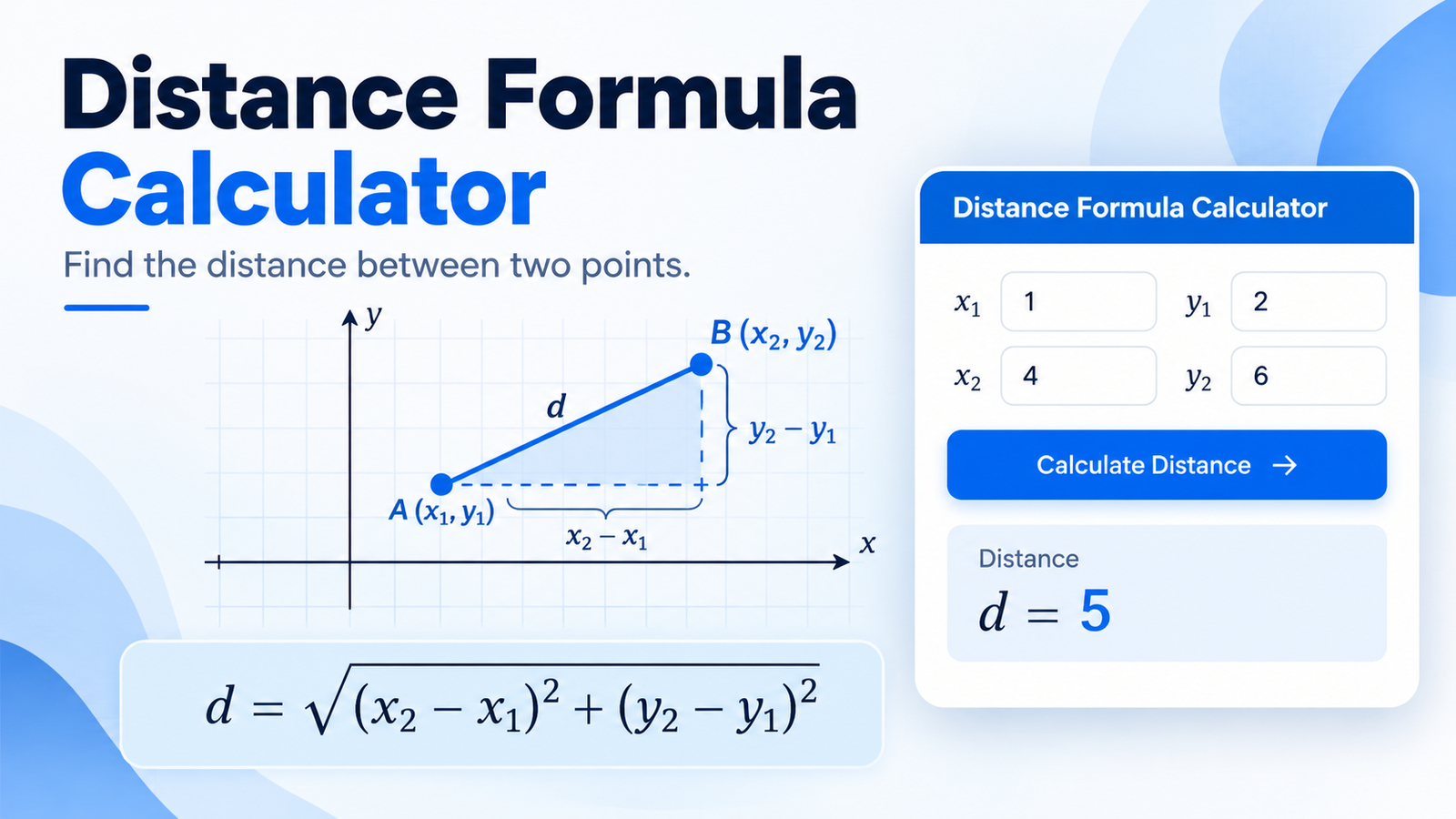
Use the Distance Formula Calculator to find the straight-line distance between two points on a 2D coordinate plane. Enter the coordinates for Point A (x₁, y₁) and Point B (x₂, y₂), then calculate the distance instantly.
The tool gives you the decimal distance, exact radical form, horizontal and vertical coordinate differences, coordinate graph, and a step-by-step solution. It is useful for students learning coordinate geometry as well as anyone who needs to check a distance calculation quickly.
What Is a Distance Formula Calculator?
A distance formula calculator finds the distance between two points using their x- and y-coordinates.
If the two points are:
A = (x₁, y₁)
and
B = (x₂, y₂)
the calculator uses the standard distance formula:
d = √((x₂ − x₁)² + (y₂ − y₁)²)
The result represents the length of the straight line connecting the two points.
Instead of manually subtracting coordinates, squaring the differences, adding them, and taking the square root, the calculator performs the complete calculation and shows the working.
How to Use the Distance Formula Calculator
The calculator is designed to keep the process simple.
1. Enter Point A
Enter the first coordinate pair:
x₁ = x-coordinate of Point Ay₁ = y-coordinate of Point A
For example:
A = (2, 3)
Enter:
x₁ = 2y₁ = 3
2. Enter Point B
Enter the second coordinate pair:
x₂ = x-coordinate of Point By₂ = y-coordinate of Point B
For example:
B = (8, 7)
Enter:
x₂ = 8y₂ = 7
3. Calculate the Distance
Select Calculate Distance.
The calculator displays:
- Distance between the points
- Exact form
- Decimal form
- Coordinate graph
- Horizontal difference
- Vertical difference
- Step-by-step calculation
You can also use Copy Result to copy the answer for notes, homework, or another document.
Distance Formula
The standard formula for finding the distance between two points is:
d = √((x₂ − x₁)² + (y₂ − y₁)²)
where:
- x₁, y₁ are the coordinates of the first point
- x₂, y₂ are the coordinates of the second point
- d is the distance between the points
The formula works because the horizontal and vertical differences form the two shorter sides of a right triangle. The straight-line distance between the points forms the hypotenuse.
This connects the distance formula directly to the Pythagorean theorem.
Distance Between Two Points Example
Suppose you want to calculate the distance between:
Point A = (2, 3)
and
Point B = (8, 7)
Step 1: Find the Horizontal Difference
Subtract the x-coordinates:
x₂ − x₁ = 8 − 2
Δx = 6
Step 2: Find the Vertical Difference
Subtract the y-coordinates:
y₂ − y₁ = 7 − 3
Δy = 4
Step 3: Substitute Into the Formula
d = √((8 − 2)² + (7 − 3)²)
Simplify:
d = √(6² + 4²)
Step 4: Square the Differences
6² = 36
4² = 16
Therefore:
d = √(36 + 16)
Step 5: Add
d = √52
Step 6: Simplify
The exact distance is:
2√13
The decimal approximation is:
7.211103
So the distance between (2, 3) and (8, 7) is approximately:
7.211 units
Why Does the Distance Formula Work?
The distance formula is based on the Pythagorean theorem.
When two points are placed on a coordinate plane, their horizontal and vertical differences can be treated as the legs of a right triangle.
For points:
A(x₁, y₁)
and:
B(x₂, y₂)
the horizontal leg has length:
|x₂ − x₁|
and the vertical leg has length:
|y₂ − y₁|
The straight line from A to B is the hypotenuse.
Using:
a² + b² = c²
gives:
(x₂ − x₁)² + (y₂ − y₁)² = d²
Taking the square root gives the distance formula.
This geometric relationship is why the formula works for points anywhere on a 2D coordinate plane.
What Are Δx and Δy?
The calculator also shows the horizontal and vertical coordinate differences.
Horizontal Difference
Δx = x₂ − x₁
This tells you how far the points differ along the x-axis.
Vertical Difference
Δy = y₂ − y₁
This tells you how far the points differ along the y-axis.
For:
A(2, 3) and B(8, 7)
the differences are:
Δx = 6
Δy = 4
These values are then squared and used in the distance formula.
Exact Distance vs. Decimal Distance
The calculator can provide the result in two useful forms.
Exact Form
The exact form keeps the square root whenever necessary.
For example:
2√13
This form is mathematically exact.
Decimal Form
A decimal approximation converts the radical into a numerical value.
For example:
7.211103
Decimal form can be more convenient for measurement or practical calculations, while exact form is often preferred in algebra and geometry work.
How to Read the Coordinate Graph
The coordinate graph helps you visualize the two points instead of seeing only numbers.
The graph displays:
- Point A
- Point B
- The direct line between the points
- Horizontal change
- Vertical change
- The right triangle associated with the distance formula
This visualization can make it easier to understand why the x- and y-coordinate differences are used.
For students, the graph also provides a quick way to check whether the entered points are positioned where expected.
Distance Formula With Negative Coordinates
The same formula works when one or both points contain negative coordinates.
For example:
A = (−3, −2)
B = (4, 6)
First calculate:
Δx = 4 − (−3) = 7
and:
Δy = 6 − (−2) = 8
Then:
d = √(7² + 8²)
d = √113
The negative signs are handled during subtraction, and the squared differences become non-negative.
This is one reason it is important to enter the coordinate signs correctly.
Distance Between Points on a Horizontal Line
If both points have the same y-coordinate, the line between them is horizontal.
For example:
A = (1, 5)
B = (8, 5)
Here:
Δy = 0
so:
d = √((8 − 1)² + 0²)
d = 7
In this case, the distance is simply the horizontal difference.
Distance Between Points on a Vertical Line
If both points have the same x-coordinate, the line between them is vertical.
For example:
A = (4, 2)
B = (4, 9)
Here:
Δx = 0
so:
d = √(0² + (9 − 2)²)
d = 7
The result is simply the vertical difference.
What If Both Points Are the Same?
If Point A and Point B have exactly the same coordinates, the distance is zero.
For example:
A = (3, 4)
B = (3, 4)
Then:
Δx = 0
and:
Δy = 0
Therefore:
d = √(0² + 0²)
d = 0
This makes sense geometrically because there is no separation between identical points.
Can the Calculator Use Decimal Coordinates?
Yes. The distance formula works with decimal coordinates as well as whole numbers and negative values.
For example:
A = (1.5, 2.2)
B = (6.3, 7.1)
The calculator can subtract the decimal coordinates and calculate the resulting distance automatically.
This is useful when coordinates come from measurements, graphs, or applications where points do not fall on whole-number positions.
Why Use a Distance Between Two Points Calculator?
A distance between two points calculator can help simplify coordinate geometry problems and reduce arithmetic errors.
Faster Calculations
Enter four coordinate values and get the result without manually performing every arithmetic operation.
Step-by-Step Working
The calculator shows how the final answer is produced instead of displaying only a number.
Coordinate Visualization
See Point A and Point B plotted on a graph.
Exact and Decimal Results
Use the radical form for exact mathematics or the decimal form for practical calculations.
Handles Negative Values
Negative coordinates are supported without requiring a different formula.
Useful for Checking Work
Students can compare their manual calculations with the calculator result and identify where an error may have occurred.
Common Distance Formula Mistakes
Mixing x- and y-Coordinates
Always subtract corresponding coordinates.
Correct:
x₂ − x₁
and:
y₂ − y₁
Do not subtract an x-coordinate from a y-coordinate.
Losing a Negative Sign
For example:
4 − (−3) = 7
not 1.
Parentheses can make calculations involving negative coordinates easier to follow.
Forgetting to Square Both Differences
Both coordinate differences must be squared before they are added.
Adding Before Squaring
The expression:
(x₂ − x₁)² + (y₂ − y₁)²
does not mean that the coordinate differences should be added first.
Forgetting the Square Root
After adding the squared differences, you must take the square root to obtain the actual distance.
Distance Formula and the Pythagorean Theorem
The distance formula is essentially the Pythagorean theorem written for a coordinate plane.
The Pythagorean theorem states:
a² + b² = c²
For coordinate geometry:
a = x₂ − x₁
b = y₂ − y₁
c = distance between the points
Substitution gives:
d² = (x₂ − x₁)² + (y₂ − y₁)²
and therefore:
d = √((x₂ − x₁)² + (y₂ − y₁)²)
Understanding this connection can make the formula easier to remember.
When Is the Distance Formula Used?
The distance formula is commonly used in:
- Coordinate geometry
- Algebra
- Geometry homework
- Graphing problems
- Mathematics exams
- Engineering calculations
- Computer graphics
- Mapping concepts
- Analytical geometry
- Physics problems involving coordinate positions
The calculator is specifically designed for 2D Cartesian coordinates.
Frequently Asked Questions
What is the distance formula?
The distance formula is:
d = √((x₂ − x₁)² + (y₂ − y₁)²)
It calculates the straight-line distance between two points on a 2D coordinate plane.
How do I find the distance between two points?
Identify the coordinates of both points, subtract the x-values and y-values, square both differences, add them, and take the square root.
Does the order of the two points matter?
No. Swapping Point A and Point B changes the signs of the coordinate differences, but squaring removes those sign differences. The final distance remains the same.
Can distance be negative?
No. Distance represents a length, so the final result is always zero or positive.
What happens if both points are identical?
The distance is 0.
Can I use negative coordinates?
Yes. The distance formula works with positive, negative, zero, and decimal coordinates.
What is the difference between exact and decimal distance?
The exact form may contain a radical such as 2√13, while the decimal form gives an approximation such as 7.211103.
Is the distance formula related to the Pythagorean theorem?
Yes. The horizontal and vertical coordinate changes form the legs of a right triangle, while the distance between the points is its hypotenuse.
Can I use this calculator for 3D coordinates?
This calculator is designed for two-dimensional points using x and y coordinates. A 3D distance calculation also requires z-coordinates.
Find the Distance Between Two Points
To calculate the distance between two coordinates, enter x₁, y₁, x₂, and y₂ into the Distance Formula Calculator and select Calculate Distance.
The tool provides the answer in exact and decimal form, shows the points on a coordinate plane, calculates Δx and Δy, and explains every step of the solution.
This makes it useful whether you simply need a quick answer or want to understand how the distance formula works.