
HTML Viewer — Live HTML Preview Online
Paste HTML and see it rendered live in a sandboxed preview.
Last updated:
HTML Viewer — Live HTML Preview Online
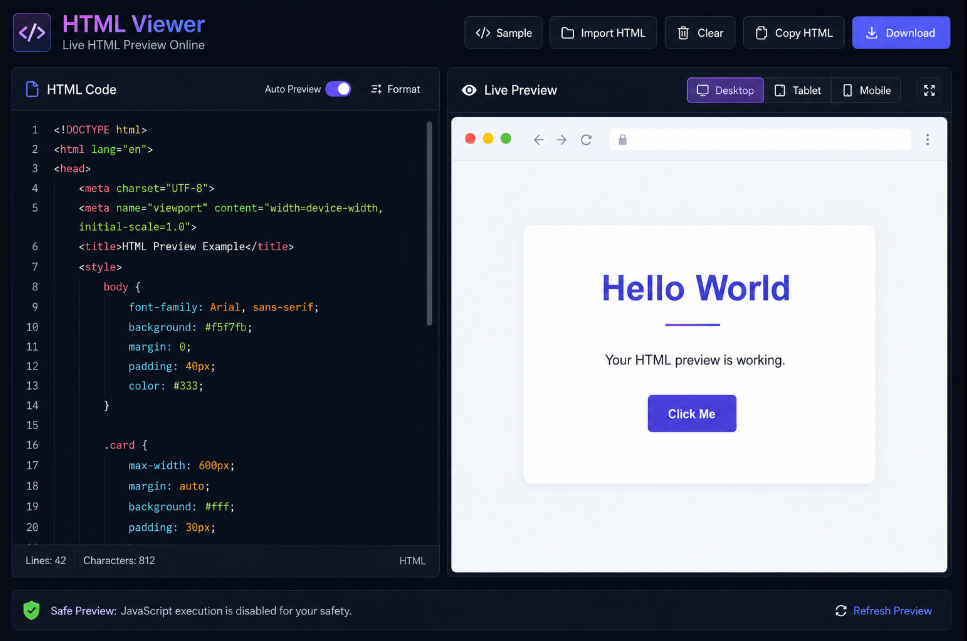
Use this free HTML Viewer Online to paste or write HTML code and instantly see how it looks in the browser.
There is no need to create a .html file, install software, or set up a development environment.
The workflow is simple:
Paste HTML → See Live Preview
As you edit the code, the preview updates automatically so you can test layouts, HTML snippets, forms, tables, inline CSS, and website sections quickly.
How to Use the HTML Viewer
- Paste or type HTML into the HTML Code editor.
- View the rendered result in the Live Preview panel.
- Continue editing and see changes automatically.
- Switch between Desktop, Tablet, and Mobile preview sizes.
- Copy or download your HTML when finished.
You can also use the Sample button if you want to test the viewer before adding your own code.
HTML Preview Example
Paste:
[object HTMLPreElement]The preview panel immediately renders the heading, paragraph, and button.
You can use either small HTML fragments or complete HTML documents.
Live HTML Preview While You Type
With Auto Preview enabled, there is no need to press a Run button after every edit.
Change:
- HTML elements
- Text
- Classes
- Inline styles
- Tables
- Forms
- Images
- Layout structure
and the rendered result updates automatically.
If you are working with larger HTML code, you can turn Auto Preview off and use Refresh Preview manually.
HTML Editor With Preview
On desktop, the tool displays:
HTML Editor | Live Preview
This makes it easy to compare your source code with the rendered output.
On smaller screens, the editor and preview automatically stack vertically for easier use on tablets and mobile devices.
Test HTML Online
The viewer is useful when you need to quickly test a small piece of HTML without opening a full IDE.
Common uses include:
- Testing HTML snippets
- Checking generated HTML
- Previewing blog HTML
- Testing tables
- Reviewing forms
- Checking inline CSS
- Debugging layout problems
- Previewing website sections
- Learning HTML
- Demonstrating HTML in classrooms
Responsive HTML Preview
Use the built-in device controls to see how your HTML behaves at different viewport widths.
Choose from:
Desktop
Preview the page at a wide desktop layout.
Tablet
Check how the HTML responds at a narrower tablet width.
Mobile
Preview the layout at a mobile-sized viewport.
This is especially helpful when testing responsive CSS and website sections.
Preview HTML and CSS
The HTML viewer supports CSS placed inside your code.
For example:
[object HTMLPreElement]The styling will appear directly in the preview.
You can use:
-
Internal
<style>blocks - Inline styles
- Basic responsive CSS
- External stylesheets when browser access allows them
HTML Fragment and Full Document Support
You do not need to write a complete HTML document.
A simple fragment such as:
[object HTMLPreElement]can be previewed immediately.
You can also paste a complete document containing:
[object HTMLPreElement]This makes the tool useful for both beginners and developers.
Safe HTML Preview
The preview runs inside an isolated iframe.
For safety, JavaScript execution is disabled in this version of the viewer.
HTML and CSS can be rendered, while potentially risky active behavior such as scripts, form submissions, popups, and nested frames is restricted.
This makes the tool better suited for quickly inspecting pasted HTML without allowing it to interact directly with the main tool page.
Import and Download HTML
If you already have an HTML file, use Import HTML to load it into the editor.
When finished, click Download to save the current code as a .html file.
This is useful for:
- Students creating HTML exercises
- Developers testing snippets
- Bloggers reviewing HTML
- Teachers preparing examples
- Freelancers checking client markup
Copy HTML With One Click
Use Copy HTML to quickly copy the complete source code to your clipboard.
You can then paste it into:
- VS Code
- A CMS
- A website builder
- A blog editor
- A code repository
- Another development tool
Who Is This HTML Viewer For?
Front-End Developers
Quickly test and debug HTML without creating temporary files.
Students
Learn HTML by writing code and seeing the result immediately.
Beginners
Experiment with headings, paragraphs, buttons, forms, images, and styles.
QA Testers
Inspect generated or copied HTML and verify how it renders.
Bloggers
Preview custom HTML before adding it to a website or CMS.
Teachers
Demonstrate HTML examples in a simple browser-based environment.
Frequently Asked Questions
What is an HTML viewer?
An HTML viewer lets you enter HTML code and see the rendered visual result in a browser preview.
Can I preview HTML online without creating a file?
Yes. Paste or type your HTML directly into the editor and view the result immediately.
Does the preview update automatically?
Yes. Auto Preview updates the rendered output while you type.
Can I preview CSS too?
Yes. Inline CSS and <style> blocks are rendered with the HTML.
Can I test responsive HTML?
Yes. Use the Desktop, Tablet, and Mobile preview modes.
Can I paste a full HTML document?
Yes. Both HTML fragments and complete documents are supported.
Does JavaScript run in the preview?
No. JavaScript is disabled in this version for safer HTML previewing.
Can I download my HTML?
Yes. You can download the current source as an .html file.
Preview HTML Online Now
Paste your HTML into the editor and see the rendered result instantly.
Whether you are learning HTML, testing a snippet, checking a responsive layout, reviewing generated code, or debugging a website section, this live HTML viewer gives you a fast way to preview HTML directly in your browser.